What if you could know when Bitcoin reaches a price you choose without watching the chart? If you’re figuring out how to get text alert when bitcoin drops, start by setting a clear price condition and choosing SMS as the notification method. The alert can notify you when Bitcoin reaches or falls below that price.
Watching charts takes time, but an alert is useful only if its trigger means what you think it means. A fixed price and a percentage decline are different conditions, so check which one the service supports before creating an alert. Coinwink offers Bitcoin price alerts by SMS, with email and Telegram as alternatives. SMS is a paid feature, so review the current plan requirements and alert limits before setup.
This guide explains how to choose a threshold, configure a text notification, and check that your settings are correct. It also covers what to verify about alert timing and delivery. A price alert provides information only. It doesn’t execute a trade, and service or network delays can affect delivery.
Key Takeaways
- Learn how to get text alert when bitcoin drops by choosing a service, setting a price condition, and selecting SMS.
- Decide whether a fixed BTC price or percentage change better matches what you want to monitor.
- Check the quote currency so the threshold matches the price you use as a reference.
- Compare SMS, email, and Telegram based on where you want to receive alerts and any plan requirements.
- Review alert limits and delivery behavior, then confirm your setup before relying on it.
How a Bitcoin price-drop text alert works
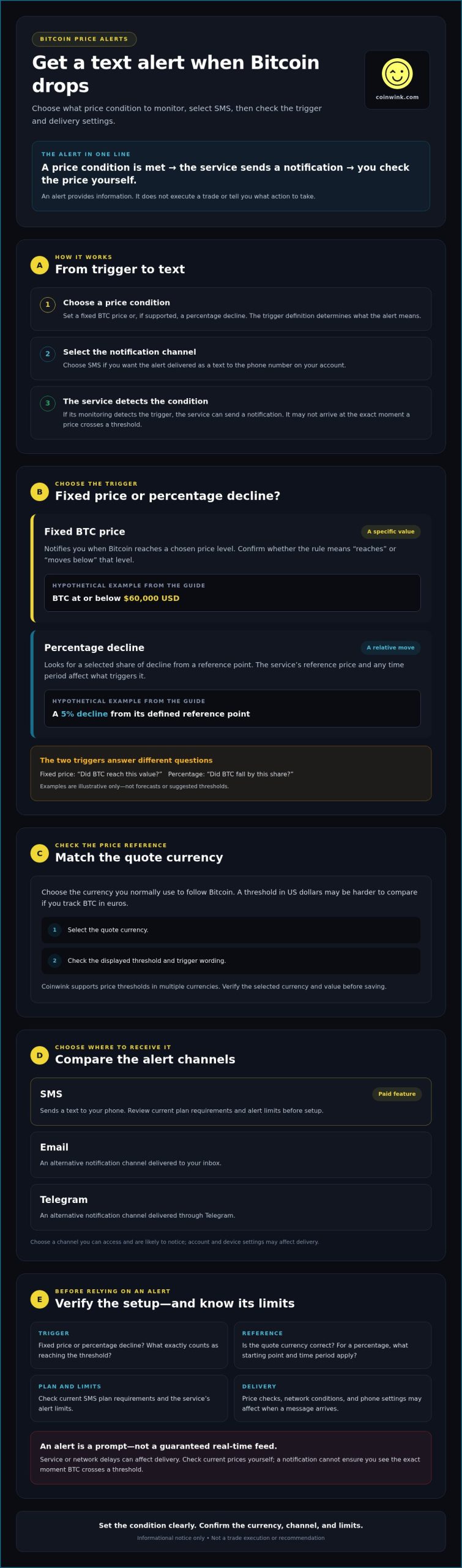
A Bitcoin price-drop text alert is a notification sent when Bitcoin meets a price condition you set in advance. The condition may be a fixed price or a percentage decline. The alert tells you that the service detected the trigger; it doesn’t place an order or tell you what to do.
Before monitoring starts, you choose the condition and notification channel. For example, you might set a hypothetical alert for Bitcoin at or below $60,000 USD. If the service detects that condition, it can send a text to the phone number on your account. This is an example only, not a forecast or a suggested threshold.
A fixed-price alert and a percentage alert track different events. A fixed-price condition looks for Bitcoin to reach a specified value. A percentage condition looks for a decline by a selected share over a defined period, if the service supports that option. Check the trigger description so you know exactly what will prompt the notification. If you’re new to what Bitcoin is, a basic overview can help clarify the asset whose price you’re monitoring.
What does a Bitcoin drop alert notify you about?
The alert reports that the price condition you chose has been met, according to the service’s monitoring. It doesn’t explain why the price changed or recommend a response. Before saving the alert, check whether it triggers when Bitcoin reaches the selected price or only after the price moves below it. That difference determines what the notification means.
Text alert versus chart watching
A text alert can reduce the need to keep a price chart open. Set the condition once, then receive a notification through your chosen service if it detects the trigger. This gives you a prompt to check a price movement without continuously watching the market. You still need to review the alert settings and check current prices yourself.
Alerts depend on the service’s monitoring and the delivery channel. Price checks, network conditions, and phone settings may affect when a message arrives. A text alert isn’t a guaranteed real-time feed, and it can’t ensure that you’ll see a price at the exact moment it crosses a threshold. Treat it as a prompt to check the information, not as an automatic action.
Choose a Bitcoin price threshold that makes sense
Choose a trigger that matches what you want to monitor. A fixed price is useful when you want to know if Bitcoin reaches a particular BTC value. A percentage decline is useful when you want to track a relative move, regardless of the starting price. Neither type predicts what Bitcoin will do next.
A price level is a specific value in a quote currency. A percentage decline measures a proportional change from a reference point, over a period or from a prior value. The exact reference point and time period depend on the alert service. Check how the platform defines them before relying on a percentage trigger.
Fixed price or percentage drop?
Imagine setting a fixed-price alert at a hypothetical value of 55,000 in your chosen currency. It triggers when Bitcoin reaches the defined level, subject to the service’s rules. A hypothetical 5% decline alert instead looks for a 5% move down from its reference point. These alerts answer different questions: “Did BTC reach this price?” and “Did BTC fall by this share?”
Before setting a percentage condition, confirm which price the service uses as its starting point and whether a time window applies. Alert tools may define these conditions differently. A guide to how to set up Bitcoin price alerts offers general setup context, but use the platform’s own trigger description to understand its exact behavior.
Set the currency and trigger level
Select the currency you normally use to follow Bitcoin. If you track prices in euros but set a threshold in US dollars, it may be harder to compare the alert with the figures you see elsewhere. Coinwink supports price thresholds in multiple currencies, so check the selected quote currency and displayed value when you configure an alert.
Choose a threshold based on what you want to monitor, not a guess about where the market is headed. You might want to know when BTC crosses a level you already follow, or when it moves down by a chosen percentage. Treat either condition as a notification rule, not a buy or sell signal.
If you’re deciding how to get text alert when bitcoin drops, the threshold is the condition the service will monitor. Choose the currency and trigger type first, then review both before saving. You can explore Bitcoin price alerts as one option for setting a threshold.
Choose SMS or another Bitcoin alert channel
The right channel is one you’re likely to notice and can access under the service’s current plan. SMS sends an alert as a text to your phone. Email delivers it to your inbox, while Telegram sends it through the Telegram service. Each depends on different account and device settings, so consider where you already check for notifications.
When a text alert is the right fit
SMS may suit you if you want a phone text without opening an email inbox or Telegram. Coinwink offers worldwide SMS alerts as a paid feature. Before choosing SMS, check the current subscription requirements and alert limits, and confirm that your number and carrier can receive messages from the service. Worldwide availability doesn’t guarantee delivery across every carrier or network.
Don’t assume a text will always arrive faster than an email or Telegram alert. Timing can depend on the alert service and delivery conditions. When comparing options for how to get text alert when bitcoin drops, choose SMS based on how you prefer to receive a notice, not on an expectation of guaranteed speed.
When email or Telegram may be enough
Email can be a practical choice if you already check your inbox regularly. Telegram may suit you if you use the app and want alerts there. Coinwink supports both email and Telegram alerts, so SMS isn’t the only option. Check the service’s current account and plan details to confirm which features and limits apply.
Compare the channels by where the alert appears and what you need to access it:
- SMS: Arrives as a phone text. Check paid-plan requirements and carrier compatibility.
- Email: Arrives in your inbox. Check that you can access the account and notice new messages.
- Telegram: Arrives through Telegram. Check that you use the app and can receive its notifications.
Choose a channel you’ll reliably check, then verify its setup before relying on it. If Telegram is your preferred option, review the service’s instructions and confirm the connection requirements. You can change channels later if your access or notification habits change.
Set up and test a text alert when Bitcoin drops
To set up a Bitcoin text alert, choose a service that supports SMS, define the price condition, and confirm your phone and plan details. The exact labels and steps vary by platform. Coinwink is one option for Bitcoin alerts through SMS, but check its current interface and requirements as you set up your alert.
- 1. Choose a service. Confirm it supports Bitcoin price alerts and SMS where you are. Check current account requirements, plan conditions, and alert limits.
- 2. Select Bitcoin. Choose BTC as the asset. Confirm you’re setting an alert for Bitcoin, not another asset with a similar name.
- 3. Set the threshold. Select the quote currency you use and enter the price condition. Choose the direction that corresponds to a drop, then read the trigger summary before saving.
- 4. Choose SMS. Select text notifications after confirming the service’s current SMS requirements. Check that your phone number and country code are correct.
- 5. Save and review. Confirm the alert appears as active, if the service provides a status indicator. Review the saved asset, currency, threshold, direction, and notification channel.
Create the Bitcoin price condition
Check how the service handles a threshold crossing. If Bitcoin moves past the set price between monitoring checks, the alert may behave differently than you expect. Look for information about repeat notifications as well. Some services may send another notice under certain conditions, while others may not. Verify the service’s explanation of crossing and repeat rules instead of assuming how they work.
Confirm SMS delivery settings
Coinwink’s SMS alerts are a paid feature. Review the current plan requirements before selecting SMS, and enter your number in the format the service accepts, including the correct country code. Don’t assume a test message or delivery report is available; those options depend on the service.
If the service provides a test option, use it to check whether your phone can receive the notification. Otherwise, review any confirmation or alert-status information available, and make sure your phone can receive texts. A setup check can confirm that your settings are in place, but it can’t guarantee every future message will arrive without delay.
For how to get text alert when bitcoin drops, checking the setup matters as much as choosing the threshold. Set up a Bitcoin alert with Coinwink, then review the current SMS requirements and verify the saved alert details.
Keep Bitcoin drop alerts useful, and know their limits
A Bitcoin alert is a prompt, not a guaranteed real-time feed. Prices can change quickly, and monitoring and delivery conditions can affect timing. SMS delivery may also depend on your account, the alert service, your phone settings, and your mobile carrier. Check that the alert remains active rather than assuming it will always stay enabled or arrive without delay.
Review your settings when your monitoring needs change. A threshold that was useful before may no longer match what you want to track. Check the quote currency, too. If you switch the currency you use to follow Bitcoin, update the alert so its value is easy to interpret.
Avoid missed or irrelevant notifications
If a text doesn’t arrive, check whether the alert is active and confirm it uses the intended BTC quote currency and threshold. Review your phone number, country code, account status, SMS plan requirements, and notification settings. If the service offers a delivery status or test option, check what it reports. These steps may help identify a setup issue, but they can’t guarantee future delivery.
Keep your alert list clear. Several nearly identical conditions can make it harder to tell which notification matters. Create separate alerts only when each one tracks a distinct threshold or monitoring need.
Use alerts as information, not trading instructions
A price notification reports that a condition was met. It doesn’t assess your finances, goals, or tolerance for risk, and it doesn’t determine what action is right for you. Review the information and make decisions independently. Don’t treat a text as an instruction to act automatically. Likewise, when managing funds across borders—whether following digital assets or using fintech solutions like DUC App for international transfers—always evaluate which tools best match your practical financial needs.
To recap, choose a service and quote currency, set a clear Bitcoin condition, select a notification channel, then confirm the saved alert and delivery settings. Revisit the threshold if your needs or reference currency change. If you want to configure an alert, explore Coinwink’s Bitcoin alerts and check its current SMS requirements before setup.
Set a clear threshold and choose your alert channel
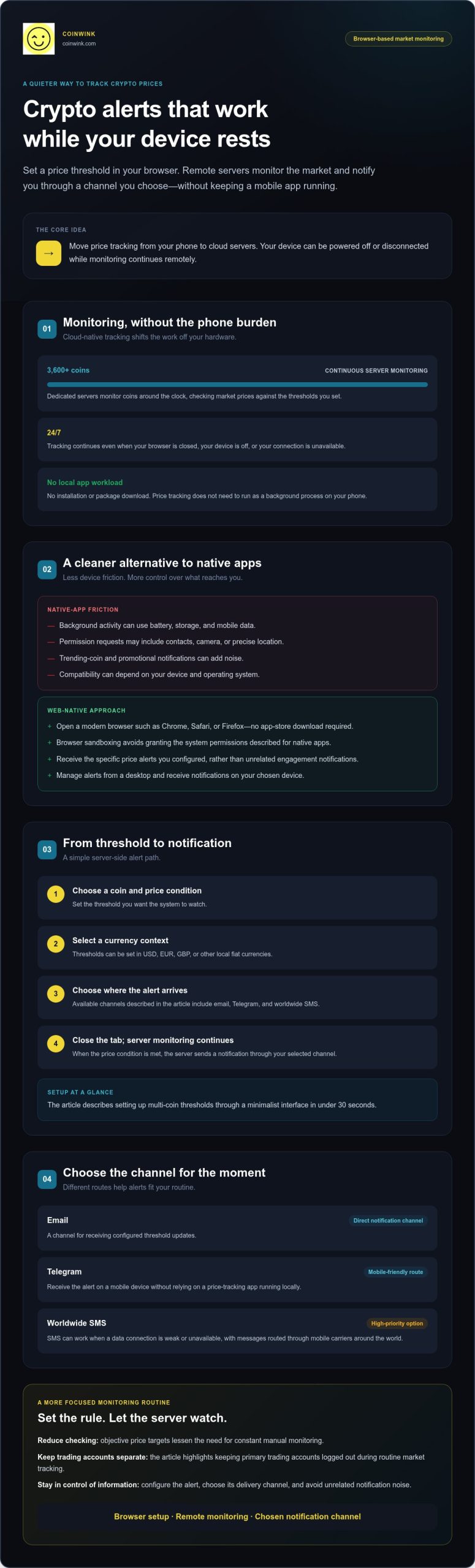
A useful Bitcoin drop alert starts with a condition you understand. Choose a fixed price or percentage decline, and confirm the quote currency so the notification is easy to interpret. Then select a channel you’ll check. Coinwink offers email and Telegram alerts, plus paid SMS notifications. Its alerts cover Bitcoin and more than 3,600 other coins and tokens, with price thresholds in multiple currencies.
Before relying on an alert, review its status, phone number, and SMS plan requirements. A notification reports a price condition; it doesn’t guarantee real-time delivery or tell you what action to take. These checks help keep the alert clear and useful.
Ready to set a Bitcoin threshold? Set up Bitcoin price alerts with Coinwink. Choose the currency and notification method that fit your needs, then verify the saved settings. A clear setup can help you monitor price changes without keeping a chart open.
Frequently Asked Questions
Can I get a text when Bitcoin drops below a specific price?
Yes. Use a crypto alert service that supports Bitcoin price thresholds and SMS notifications. Set a price in your chosen quote currency and select the condition that triggers when Bitcoin reaches or falls below it. Check the service’s trigger rules before saving, since conditions can vary. The alert reports a price event only. It doesn’t recommend an action or place an order.
How do I set up a text alert for a Bitcoin price drop?
Choose a service with Bitcoin SMS alerts, select BTC, enter a threshold and quote currency, then choose SMS and save the alert. These are the basic steps for how to get text alert when bitcoin drops. Confirm your phone number and review the current SMS plan requirements. Check that the alert is active and, if the service allows it, test your notification settings.
Are Bitcoin SMS price alerts free?
It depends on the service. Coinwink SMS alerts are a paid feature, while free accounts provide basic notification features. Check current plan requirements and alert limits before choosing SMS. Email or Telegram may be available as alternatives, depending on the service and account conditions. Don’t assume that texts are included in a free plan or that carrier charges are covered.
Can Coinwink send me a text when Bitcoin drops?
Yes. Coinwink supports Bitcoin price alerts by SMS. Set a Bitcoin price condition and choose SMS as the notification channel. SMS access is a paid feature, so review current plan requirements and alert limits before setup. Confirm your phone number and check that the saved alert uses the intended threshold and quote currency. The text reports the trigger; it doesn’t place a trade.
Will I receive a Bitcoin text alert immediately when the price falls?
Not necessarily. An alert isn’t a guaranteed real-time feed. Timing can depend on the service’s monitoring and delivery conditions, your account and phone settings, and mobile carrier networks. Check the service’s explanation of how it evaluates thresholds, including what happens if Bitcoin moves past a selected price between checks. Treat the message as a prompt to review current information, not as a precise record of when the price crossed the threshold.
Can a Bitcoin price alert automatically buy Bitcoin when it drops?
No. A Bitcoin price alert sends a notification when its specified condition is met. It doesn’t automatically buy Bitcoin or execute another trade. Coinwink provides crypto alerts, not an automated trading service. If you receive a text, review the information and make decisions independently. The alert doesn’t assess your finances, goals, or risk tolerance, and it shouldn’t be treated as trading instructions.